
Call of Duty: Warzone Mobile has evolved significantly since its initial launch, solidifying its position as a premier mobile battle royale experience in 2026. The game continues to bring the iconic maps of Verdansk and Rebirth Island to players on the go, with full cross-platform progression that seamlessly syncs Operators, weapon levels, and Battle Pass rewards between mobile, console, and PC versions. However, achieving a smooth, visually impressive, and competitive experience on a mobile device requires careful optimization. This comprehensive guide delves into the best settings for visuals and performance, ensuring every player can enjoy the action without technical hindrances.
🔧 Minimum Requirements for Warzone Mobile in 2026
Before diving into settings, it's crucial to verify your device meets the game's demands. Warzone Mobile has seen updates that slightly raise the performance floor for an optimal experience.
| Platform | Minimum Requirements (2026) | Recommended Specs (2026) |
|---|---|---|
| Android | 4 GB RAM, Adreno 618 GPU or equivalent, Android 10+ | 6-8 GB RAM, Adreno 730 / Mali-G710 or better, Android 13+ |
| iOS/iPadOS | 3 GB RAM, iOS/iPadOS 16.0+, A12 Bionic chip or later (excludes iPhone 8) | 4+ GB RAM, iOS/iPadOS 17+, A15 Bionic chip or later |
Important Note: Compatible Apple devices include iPhone SE (2nd gen or later), iPad Air (3rd gen or later), and iPad mini (5th gen or later). For Android, always check your specific device's chipset (Snapdragon, Dimensity, Exynos) and GPU against the Adreno 618 baseline.
🎮 Best Graphic Settings for Performance & Visuals
Finding the perfect balance between a smooth frame rate and clear visuals is the key to success. Should you prioritize spotting enemies at a distance, or ensure your game never stutters in a close-quarters fight?
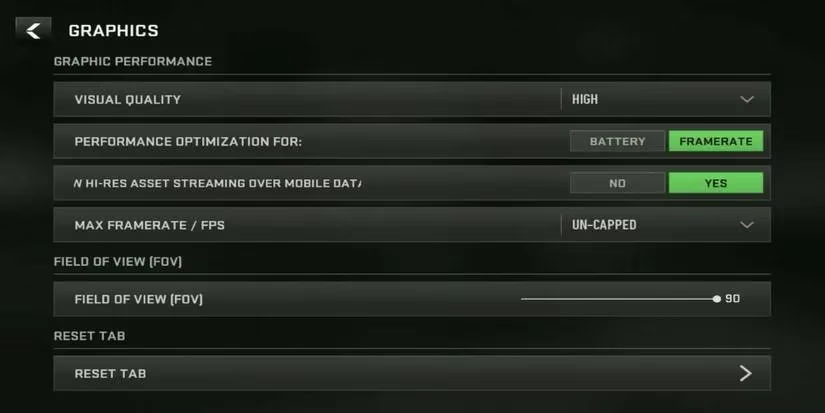
Here is a breakdown of the most critical graphics settings, with configurations for different device tiers:
For Competitive Play (Prioritizing High FPS):
-
Graphics Quality: Low or Medium. This reduces visual clutter and maximizes frame rates.
-
Frame Rate: Set to the maximum your device can consistently handle (e.g., 60 FPS or higher if supported).
-
Resolution: Native device resolution is fine, but consider lowering it slightly on older devices for a stable FPS.
-
Texture Quality: Low or Medium.
-
Shadow Quality: Disable or set to Lowest. Shadows are resource-intensive and often obscure visibility.
-
Anti-Aliasing: Off or Low (SMAA).
-
Depth of Field: Off. This cinematic effect blurs the background and can hide enemies.
-
World Motion Blur & Weapon Motion Blur: Off. These effects reduce clarity during fast movements.
For Balanced Visual Fidelity & Performance:
-
Graphics Quality: Medium or High.
-
Frame Rate: Target a stable 60 FPS.
-
Texture Quality: Medium or High (if you have sufficient RAM).
-
Shadow Quality: Low.
-
Anti-Aliasing: Medium (FXAA or SMAA).
-
Depth of Field: Personal preference, but generally Off for competitive play.
-
Motion Blur: Off.
📱 Optimizing Your HUD and Controls
Warzone Mobile offers extensive HUD customization. A cluttered screen can be a significant disadvantage. How can you arrange your controls to react faster and see more of the battlefield?
Key HUD Principles:
-
Declutter: Move non-essential informational widgets to the edges of the screen.
-
Control Layout: Position your fire, aim, and movement buttons comfortably for your thumbs. Utilize the pre-set HUD layouts as a starting point and then customize.
-
The Controller Advantage: For the absolute best visual experience, connect a compatible Bluetooth controller. You can then hide all on-screen touch controls by selecting each button and choosing "Hide Button". This gives you an unobstructed, console-like view.
-
Size & Transparency: If using touch controls, reduce their size and increase transparency to maximize the visible play area.
💪 Tying It All Together: From Settings to Victory
Optimizing your settings is just the first step toward dominating Verdansk. The true meta of Warzone Mobile in 2026 involves synergizing your performance setup with powerful weapon builds. Why spend time fine-tuning your graphics if your loadout isn't equally optimized?
The game features a vast arsenal, and the weapon meta is always shifting. Based on the extensive directory of builds provided, certain weapon categories consistently stand out:
Top-Tier Weapon Categories for 2026:
Assault Rifles (ARs): The backbone of many loadouts. Meta picks often include:
-
SVA 545: Excellent for aggressive play with a fast time-to-kill.
-
RAM-7 & MCW: Renowned for their reliability and manageable recoil.
-
BP50 & Holger 556: Powerful options that blend damage and fire rate effectively.
Submachine Guns (SMGs): Essential for close-quarters combat on Rebirth Island and in final circles.
-
HRM-9 & RAM-9: Currently dominant for their incredible mobility and close-range damage.
-
WSP Swarm & Rival-9: Fantastic alternatives with high rates of fire.
Sniper & Marksman Rifles: For long-range dominance on Verdansk.
-
KATT-AMR & XRK Stalker: One-shot-kill potential to the upper torso/head.
-
MCW 6.8 & MTZ Interceptor: Faster-firing marksman rifles for versatile engagements.
Building these weapons with the right attachments—focusing on recoil control, aim-down-sight speed, and damage range—is crucial. The provided guides for each weapon offer the blueprint for creating a custom loadout that suits your playstyle.
🎯 Final Recommendations for 2026
-
Start Low, Adjust Up: Begin with the competitive/low graphics settings. If your device maintains a stable, high frame rate, gradually increase texture and shadow quality until you find your device's sweet spot.
-
Monitor Device Temperature: Prolonged play can cause throttling. Use a cooler phone case or play in a cool environment to maintain performance.
-
Close Background Apps: Ensure Warzone Mobile has access to all your device's RAM and processing power.
-
Practice Your Setup: Spend time in Resurgence or Plunder modes to get accustomed to your new HUD layout and graphical clarity before jumping into a high-stakes Battle Royale.
By meticulously applying these visual, performance, and HUD settings, you transform your mobile device into a competitive platform. Remember, the goal is to remove barriers between you and the game—whether that's a laggy frame rate, a blurry enemy, or a poorly placed button. With your device optimized, you can focus on the core pillars of Warzone success: positioning, teamwork, and mastering the meta weapon builds that define the 2026 season.